How to create menu entry in Vehicle manager - Joomla Car dealer software
Vehicle Manager is Car dealer software for build a car website. With Joomla Car dealer software you can manage easily different types of vehicles: cars, trucks, trailers, vans, bikes, motorcycles, boats, yachts, campers and more. In this article we will show you how to create menu entry in Joomla Car dealer software - Vehicle manager.
Easy Step for create Menu entry for Vehicle Manager - Joomla Car dealer software
In order to access Vehicle Manager in the frontend of your website, you will need to create a menu item for it.
In the Joomla admin panel go to Menu > Main Menu > Add New Menu Item.
Next click on button Select, choose Vehicle manager > All categories or Alone category; Owners list; Show my vehicles; Show owners vehicles.
You will then enter the screen with the detailed settings for your menu entry.
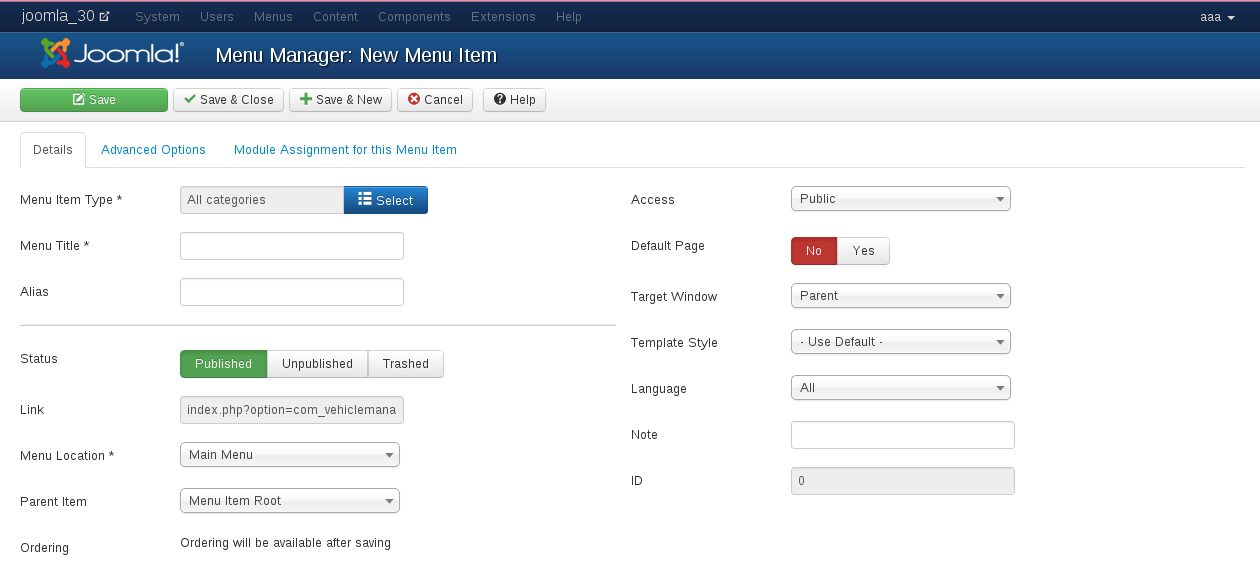
- Menu Title. Choose a title for your menu entry. This will also be the name which reflects in the URLs. You can choose any name you want, it does not need to be Vehicle Manager.
- Alias. The Alias you choose for your menu entry.
- Status. Select Publish to create the new Vehicle Manager menu item.
- Link. This will be automatically filled field.
- Menu Location. Choose the menu which this link to Vehicle Manager will display in.
- Parent Item. Choose the parent menu item which you want your Vehicle Manager menu item to be under.
- Ordering. Choose where in the list the Vehicle Manager entry will appear.
- Access. Set the user rights level which will be allowed to access the Vehicle Manager menu item in the frontend.
- Target window. Choose “Parent window with navigation”.
- Language. Choose your language
Save your menu entry. Once it is saved, you are returned to the menu you choose earlier. Now you can rearrange the menu items until you are happy with the ordering.
You now have a menu item in the frontend of your website which allow your users to access Vehicle Manager.
Create a base of search menu for Vehicle Manager
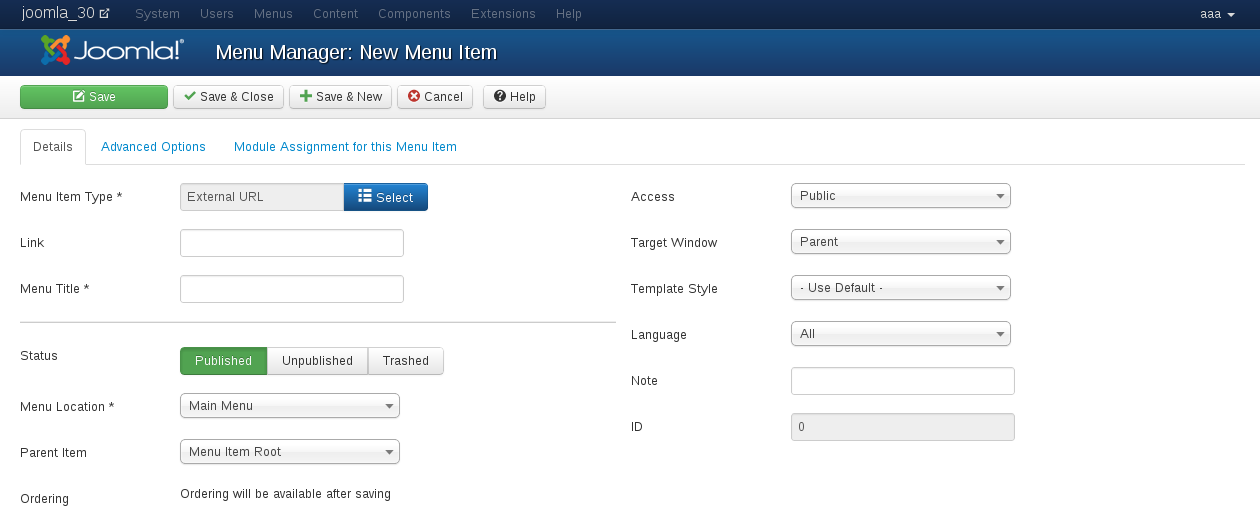
Copy link on page what you want see on main menu. In the Joomla admin panel go to Menu > Main Menu > New Menu Item. Click button Select and choose menu item System links > External link. Then put your copied link in field Link.
Documentation of Vehicle Manager - Car rental Dealer software for build a car website
- Vehicle Manager - Joomla car rental dealer software, for rent and sell cars
- How to install Vehicle Manager - Joomla car rental dealer software, for rent and sell cars
- How to configure settings of Vehicle Manager - Joomla car rental dealer software
- How to create and edit vehicle categories in Vehicle manager - Joomla Car rental software for build car rental website
- Frontend Category View in Vehicle Manager - Joomla Car dealer software
- Frontend Vehicle List View in Vehicle Manager - Joomla car rental dealer software, for rent and sell cars
- Front End Vehicle Details Page in Vehicle Manager - Joomla car rental software
- Submitting Reviews in Vehicle Manager - Joomla Car rental software
- How to Manage and edit reviews in Vehicle Manager - car rental dealer software, for rent and sell cars
- Submitting Rent Requests in Vehicle Manager - Joomla car rental dealer software, for rent and sell cars
- Managing Rent Requests in Vehicle Manager - Car rental software
- Vehicle Search in the Vehicle Manager - Joomla car rental dealer software, for rent and sell cars
- Entering Vehicles manually in Vehicle manager - Joomla car rental dealer software, for rent and sell cars
- Using Manager of Vehicles in Joomla Car dealer software - Vehicle manager
- How to print reports in Vehicle Manager - Joomla car rental dealer software
- How to Export Vehicles to CSV, XML and full XML in Vehicle Manager - Joomla car rental dealer software
- Importing vehicles from CSV, XML, full XML into Vehicle Manager - Joomla car rental dealer software, for rent and sell cars
- How to add a new language to Vehicle manager - Joomla car rental dealer software, for rent and sell cars
- CAPTCHA in Vehicle Manager - Joomla car rental dealer software
- How to upgrade Vehicle Manager - Joomla car rental dealer software, for rent and sell cars
we support payment systems